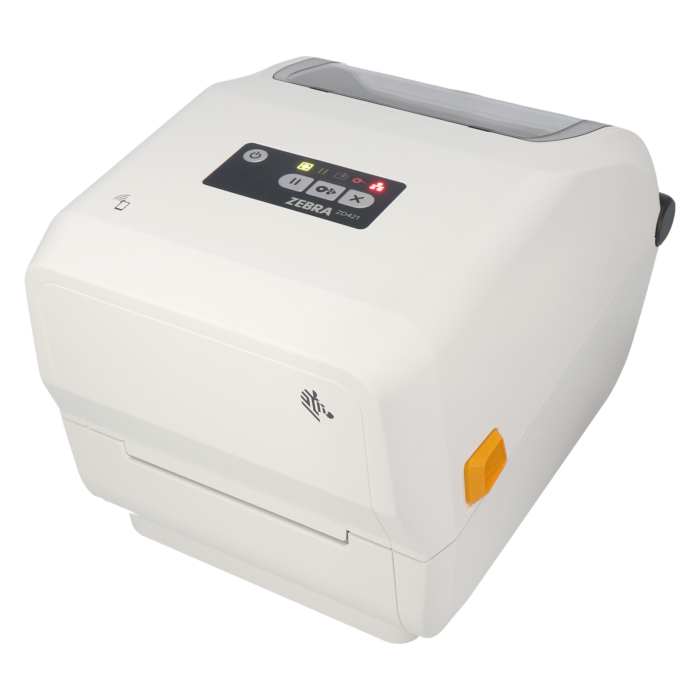


Zebra printer ZD421-HC - tear-off edge
Zebra ZD421-HC, 300 dpi desktop printer, model with tear-off edge (ZD4AH43-30EE00EZ), successor to ZD420-HC (ZD42H43-T0EE00EZ)
- printing method:
- direct thermal, thermal transfer
- max. print width:
- 108 mm
- max. print speed:
- 102 mm/s
- interfaces:
- Bluetooth (BLE), LAN, USB, USB-Host
Details
What are the key features of desktop printer such as the ZD421-HC?
Desktop printers are suitable for work environments with limited space. Thanks to their compact design, they can be easily integrated into shipping, warehouse, production, or office areas, even where there is little available surface space. Furthermore, they are characterized by ease of use, versatility, and cost-effectiveness. The ZD421-HC label printer (healthcare version) is specifically designed for healthcare applications.
Which printing methods does the printer ZD4AH43-30EE00EZ support?
The printer ZD421-HC with item number ZD4AH43-30EE00EZ supports the direct thermal and thermal transfer printing method.
The direct thermal printing method is fast, cost-effective, and suitable for high print volumes. The printhead selectively heats specific areas of the label material. The heat-sensitive coating turns black in the heated areas, creating the printed image. This remains clearly legible throughout transportation and logistics processes.
The thermal transfer printing method produces durable, smudge-resistant, and scratch-resistant print images and is therefore suitable for applications with high durability requirements. This method requires a ribbon. Heat from the printhead transfers the ink from the ribbon onto the label material.
Which thermal transfer ribbons can be used?
All thermal transfer ribbons with a maximum ribbon length of 300 m, a core diameter of 1 inch (25.4 mm) and a maximum ribbon width of 109.2 mm can be used.
Which roll labels are compatible with the label printer ZD421-HC?
All roll labels with a core diameter of 0.5 inch (12.7 mm), 1 inch (25.4 mm) and a maximum outer roll diameter of 127 mm are compatible with the label printer ZD421-HC. Labels with outside wound are also suitable.
Which label formats can the ZD421-HC print?
The ZD421-HC can process roll labels from 15 mm to 112 mm in width. The maximum print width is 108 mm.
What print quality does the ZD421-HC offer?
The printhead has a resolution of 300 dpi. This resolution is suitable for printing text, fine barcodes, or graphics. It is frequently used for product identification or nameplate labels.
Which interfaces does the desktop printer ZD421-HC support?
The desktop printer supports the following interfaces: Bluetooth (BLE), LAN, USB, USB-Host.
What features does the printer ZD421-HC offer?
The basic unit features an integrated tear-off edge. After printing, the labels and the backing material can be manually torn off against the serrated tear-off edge.
How do I install the printer ZD421-HC?
To set up the printer, first download the Windows printer driver provided in the "Downloads" tab and install it on your PC. Do not connect the device until the driver has been installed. Then connect it to your PC via USB. Afterward, add the device in the Windows settings.
We recommend using this printer with Windows. Please note that we do not provide support for macOS.More Information
| manufacturer | Zebra |
|---|---|
| model | ZD421-HC |
| productdescription | desktop printer |
| type | model with tear-off edge |
| used device | nein |
| interfaces | Bluetooth (BLE), LAN, USB, USB-Host |
| resolution (dpi) | 300 |
| outer diameter label roll (mm) | 127 |
| color | white |
| roll width max. (mm) | 112 |
| roll width min. (mm) | 15 |
| printing method | direct thermal, thermal transfer |
| core diameter label roll | 0,5 Zoll (12,7 mm), 1 Zoll (25,4 mm) |
| label roll winding | Außenwicklung |
| ribbon winding | Außenwicklung |
| ribbon core diameter | 1 inch (25.4 mm) |
| ribbon length max. (m) | 300 |
| ribbon width max. (mm) | 109,2 |
| printwidth max. (mm) | 108 |
| print speed max. (mm/s) | 102 |
| scope of delivery | EU-Netzkabel, Kurzanleitung, UK-Netzkabel, Printer(s), power supply, USB connection cable, software |
| operating system | We recommend this printer for use with windows, we do neither recommend nor support usage with MacOS. |
| GTIN | 4059312134404 |
| Gewicht (kg) | 2,3 |
Download
Compliance
| manufacturer contact data |
ZEBRA TECHNOLOGIES GERMANY GMBH Wiesenstraße 5 65843 Sulzbach Germany https://www.zebra.com/de/de/about-zebra/contact-zebra.html |
|---|