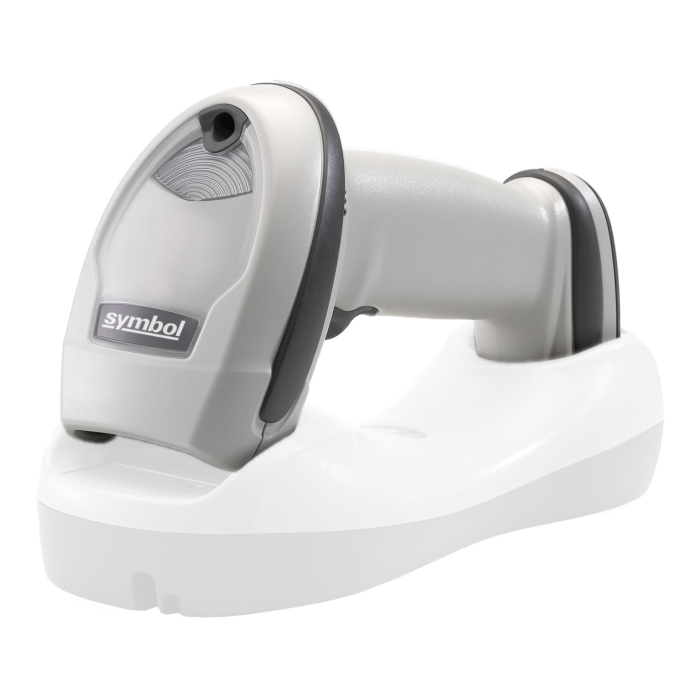


Zebra LI4278 barcodescanner
Zebra LI4278, hand scanner, Linear Imager, IP53, white (LI4278-SR20001WR)
- readable codes:
- 1D
- :
- bluetooth
- reading range up to:
- 1.4 m
- scope of delivery:
- scanner
- Please note:
- Charger/data transfer station and connection cable must be ordered separately
Details
How can the barcode scanner be connected to the system?
The connection to the system is made via bluetooth. This makes the scanner mobile and suitable for workplaces where freedom of movement is required. In addition, the scanner can be connected to the system via the charging and transfer station.
What is included in the scope of delivery of the Zebra LI4278?
The Zebra LI4278 comes with: scanner.
Which barcodes can be scanned with the Zebra LI4278 scanner?
The Zebra LI4278 captures 1D.
What does degree of protection IP53 mean?
The IP53 protection rating means that the barcode scanner is dust-protected and offers protection against falling spray water up to an angle of 60° to the vertical.
How far away from the base unit can the barcode scanner be used?
The scanner can be used up to 100 m away from the base unit.
What is the scanner's range when reading barcodes?
The scanner recognizes barcodes from a distance of up to 1.4 m.
Up to what height is the scanner drop-proof?
The scanner is designed to withstand drops from heights of up to 1.5 m onto concrete.
What is the battery capacity of the barcode scanner?
The battery capacity is 2600 mAh, enabling approximately 57000 scans per charge. The exact number depends on factors such as scanning frequency, activated additional functions (e.g., Bluetooth), and environmental conditions such as temperature.
How is a successful barcode scan indicated?
After the barcode is scanned, confirmation is provided visual, acoustic.
How can I set up my Zebra barcode scanner?
You can set up your barcode scanner on your PC using the Zebra 123scan-software. The Windows utility supports quick and easy configuration and offers the option to customize advanced settings such as interfaces, barcode fonts, or signal options.
More Information
| scanner series | LI4278 |
|---|---|
| manufacturer | Zebra |
| model | LI4278 |
| productdescription | Handscanner |
| scan options | 1D |
| scanning technology | Linear Imager |
| connection | Bluetooth |
| Protection class | IP53 |
| decoding feedback | visuell, akustisch |
| radio range up to (m) | 100 |
| reading range up to (m) | 1,4 |
| scans per charge up to | 57000 |
| drop resistance on concrete up to (m) | 1,5 |
| battery capacity (mAh) | 2600 |
| color | white |
| scope of delivery | Scanner |
| GTIN | 4060533101809 |
| Gewicht (kg) | 0,34 |
Download
Compliance
| manufacturer contact data |
ZEBRA TECHNOLOGIES GERMANY GMBH Wiesenstraße 5 65843 Sulzbach Germany https://www.zebra.com/de/de/about-zebra/contact-zebra.html |
|---|