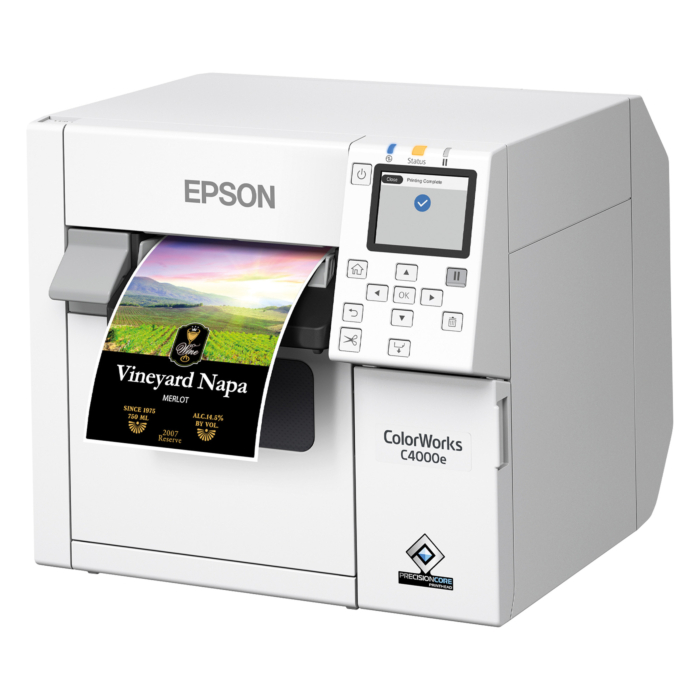


Epson printer C4000e (BK) - cutter
Epson ColorWorks C4000e (BK), 1200x1200 dpi Inkjet printer, LCD display, cutter (epsc4000s)
- printing method:
- inkjet
- max. print width:
- 108 mm
- max. print speed:
- 100 mm/s
- interfaces:
- LAN, USB
Details
What distinguishes Inkjet printer such as the ColorWorks C4000e (BK)?
Inkjet printers work with liquid ink that is applied directly to the label material in extremely fine droplets. This printing method enables particularly high print resolution and is ideal for displaying images, logos, and color information.
What is special about the C31CK03102BK inkjet printer?
The Epson ColorWorks C4000 series combines a compact desktop design with high print resolution. This printer in the series is specifically designed for printing color labels with a glossy print finish.
Which roll labels are compatible with the ColorWorks C4000e (BK) label printer?
The ColorWorks C4000e (BK) label printer uses high-gloss white inkjet paper labels that absorb ink and dry quickly. Compatible are all roll labels with a core diameter of 1.57 inch (40.0 mm) and a maximum outer roll diameter of 101.6 mm. All labels with outside wound are suitable.
What label formats can the ColorWorks C4000e (BK) print?
The ColorWorks C4000e (BK) can process roll labels with widths ranging from 25.4 mm to 112 mm. The maximum print width is 108 mm.
What is the print quality of the ColorWorks C4000e (BK)?
The printhead has a resolution of 1200x1200 dpi. This resolution is suitable for printing high-resolution color labels with graphics, logos, small text, and detailed barcodes. It is primarily used in applications where high print quality and precise color reproduction are required.
Which interfaces does the Inkjet printer ColorWorks C4000e (BK) support?
The Inkjet printer supports the following interfaces: LAN, USB.
What features does the ColorWorks C4000e (BK) printer offer?
The base unit is equipped with a cutter. The labels are automatically cut off after printing.
Where can I buy the Epson label printer ColorWorks C4000e (BK)?
You can order the Epson label printer ColorWorks C4000e (BK) directly from the Labelident online shop. Alternatively, orders can also be placed by phone or email. If you have any questions about the printer or need help selecting the right product, free telephone support is available.
How do I install the ColorWorks C4000e (BK) printer?
To set up the printer, first visit our Drivers for Label Printers page to access the appropriate Epson download page and download the corresponding Windows printer driver. Install the driver on your PC. Do not connect the device until the driver has been installed, then connect it to your PC via USB. Afterward, add the device in the Windows settings.
We recommend using this printer with Windows. Please note that we do not provide support for macOS.More Information
| manufacturer | Epson |
|---|---|
| model | ColorWorks C4000e (BK) |
| productdescription | Inkjet Drucker |
| type | model with cutter |
| display | LCD Display |
| used device | nein |
| interfaces | LAN, USB |
| resolution (dpi) | 1200x1200 |
| outer diameter label roll (mm) | 101,6 |
| roll width max. (mm) | 112 |
| roll width min. (mm) | 25,4 |
| printing method | InkJet |
| use info | Black Mark Sensor |
| core diameter label roll | 1,57 Zoll (40 mm) |
| label roll winding | Außenwicklung |
| printwidth max. (mm) | 108 |
| print speed max. (mm/s) | 100 |
| scope of delivery | Tintenpatrone/n, Printer(s), power supply, EU power cord, USB connection cable, instruction manual |
| operating system | We recommend this printer for use with windows, we do neither recommend nor support usage with MacOS. |
| GTIN | 4059312154273 |
| Gewicht (kg) | 12 |
Download
Compliance
| manufacturer contact data |
Epson Deutschland GmbH Schiessstraße 49 40549 Düsseldorf Germany kontakt_de@epson.de |
|---|